 Ayuda Trámites
Book a SEPE appointment online or call 91 926 79 70 for unemployment benefits and other procedures. Jobseeker registration is handled by your regional employment service. Use the assistant on the right of this page to find the correct service.
Before You Book
To claim unemployment benefit or a subsidy, you normally need to register as a jobseeker with your regional employment service first. In Ceuta and Melilla, SEPE handles registration. If you were registered at any point in the previous 180 days, SEPE registers you automatically.
How to Book a SEPE Appointment Online
- Open the official SEPE appointment page.
Go to the official SEPE appointment page:
Official SEPE Portal
Then select Iniciar Solicitud / Anular Cita.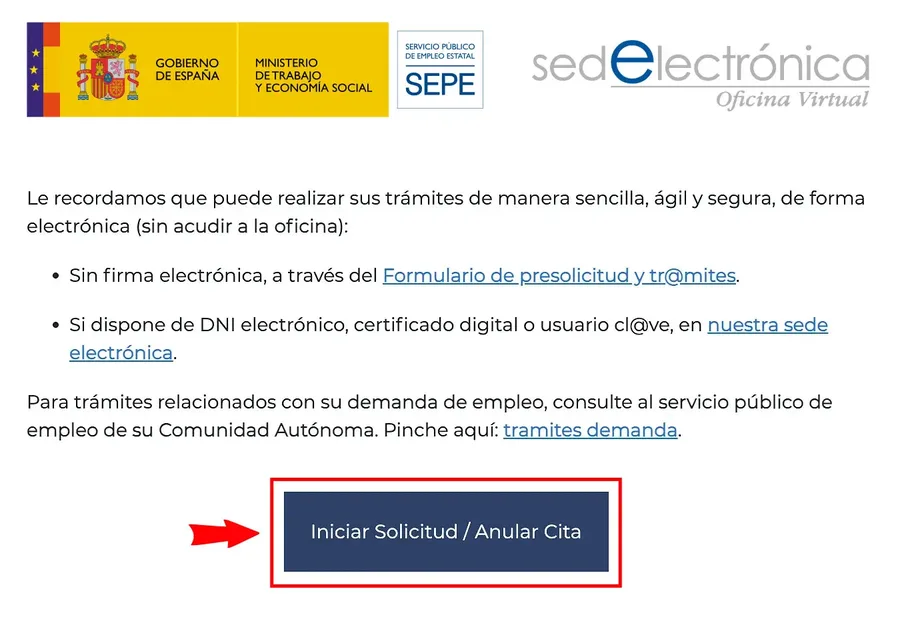
The SEPE appointment page: start with "Iniciar Solicitud / Anular Cita". - Enter the booking details.
Enter your postcode and ID number, then choose the procedure that best matches your situation. Your postcode decides which SEPE office covers you. For example:
- If you have just finished a job and want to apply for or restart unemployment benefit, choose He finalizado un trabajo...
- For general questions or submitting documents, choose Información general, entrega documentación... Change your bank details in the Área Personal without an appointment.
Some procedures open a second Subtrámite menu with more specific options. Choose the closest match, then select Continuar.
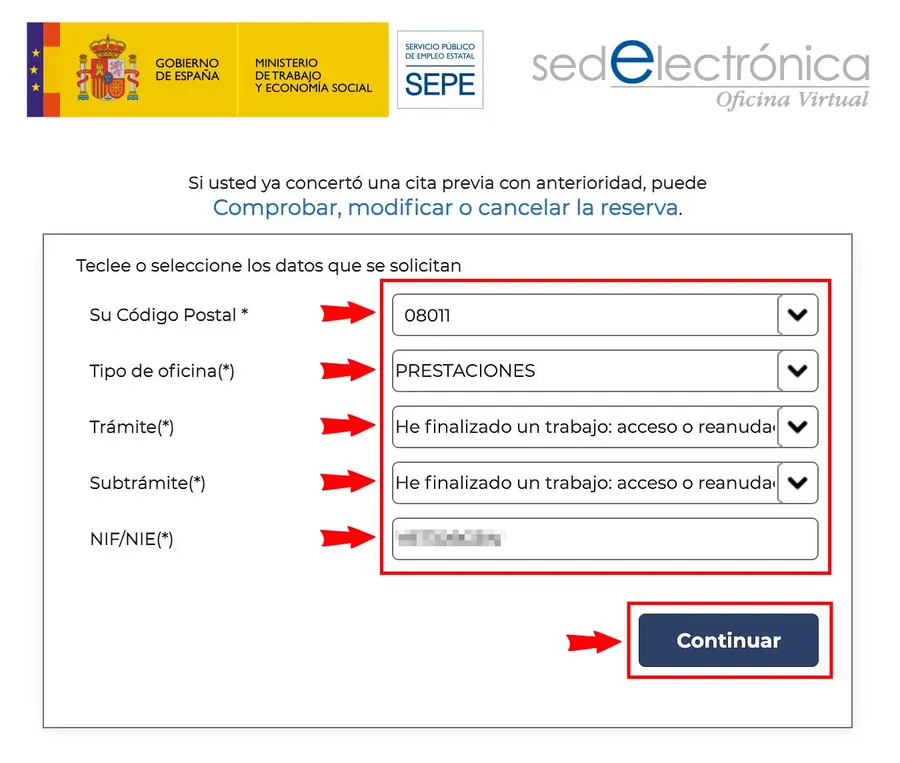
Enter the booking details and select "Continuar". - Choose the available channel or office.
Select one of the options offered by the system. Depending on the location and procedure, the system may show nearby offices or other available appointment options.
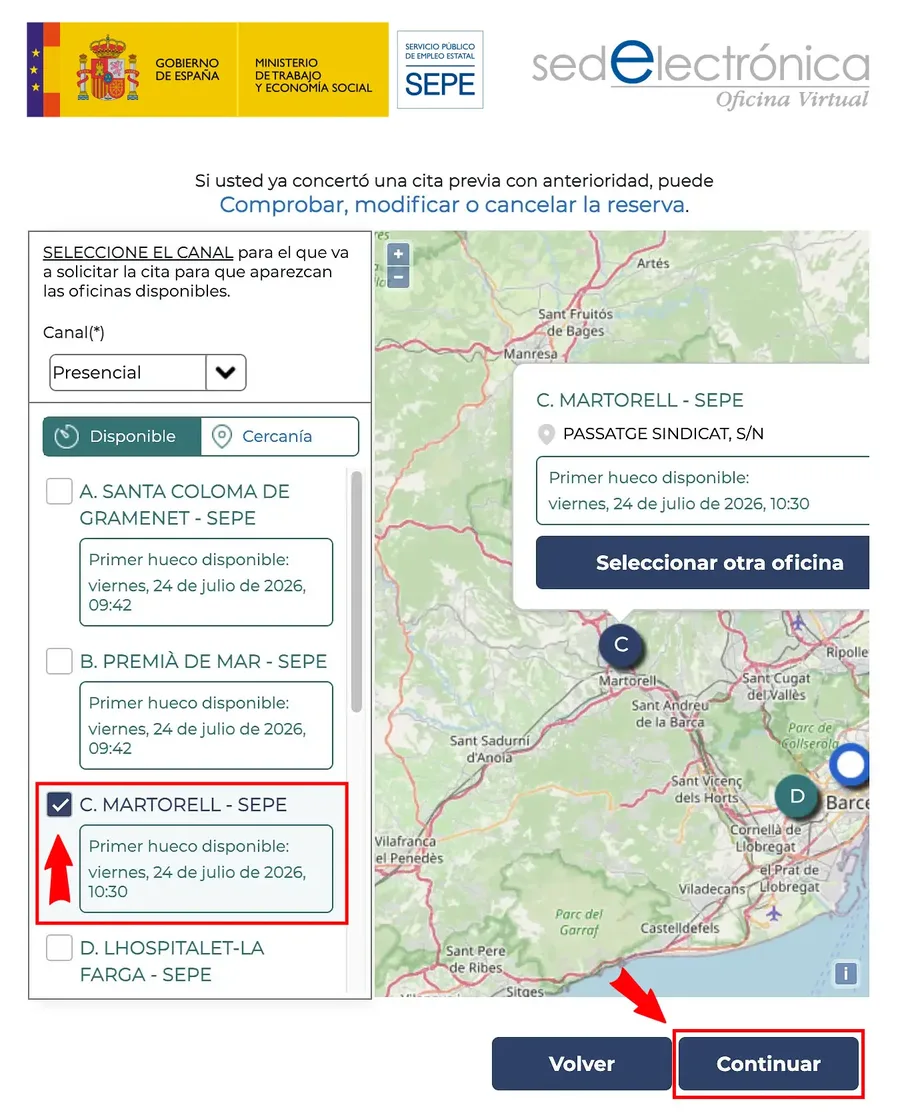
Select one of the offices or channels the system offers. - Select a date and time.
The system first suggests the soonest available appointment.
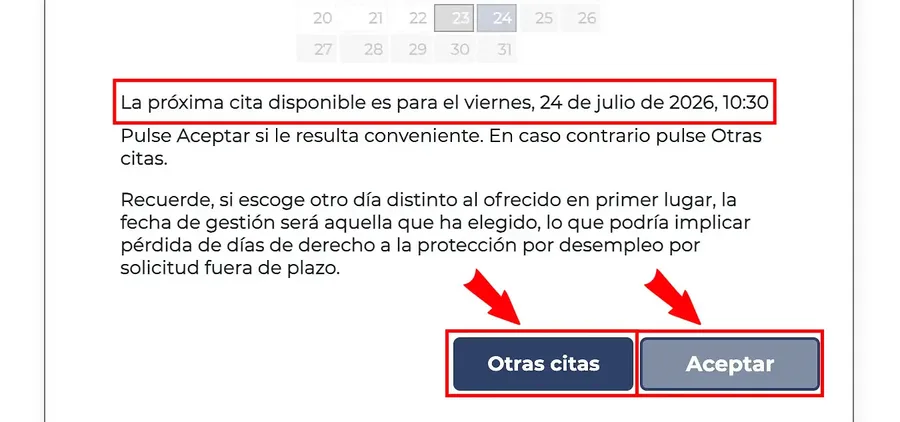
The system suggests the soonest available appointment. To accept it, select Aceptar. If you prefer another day, select Otras Citas and pick a date and time slot from the calendar, then select Continuar.
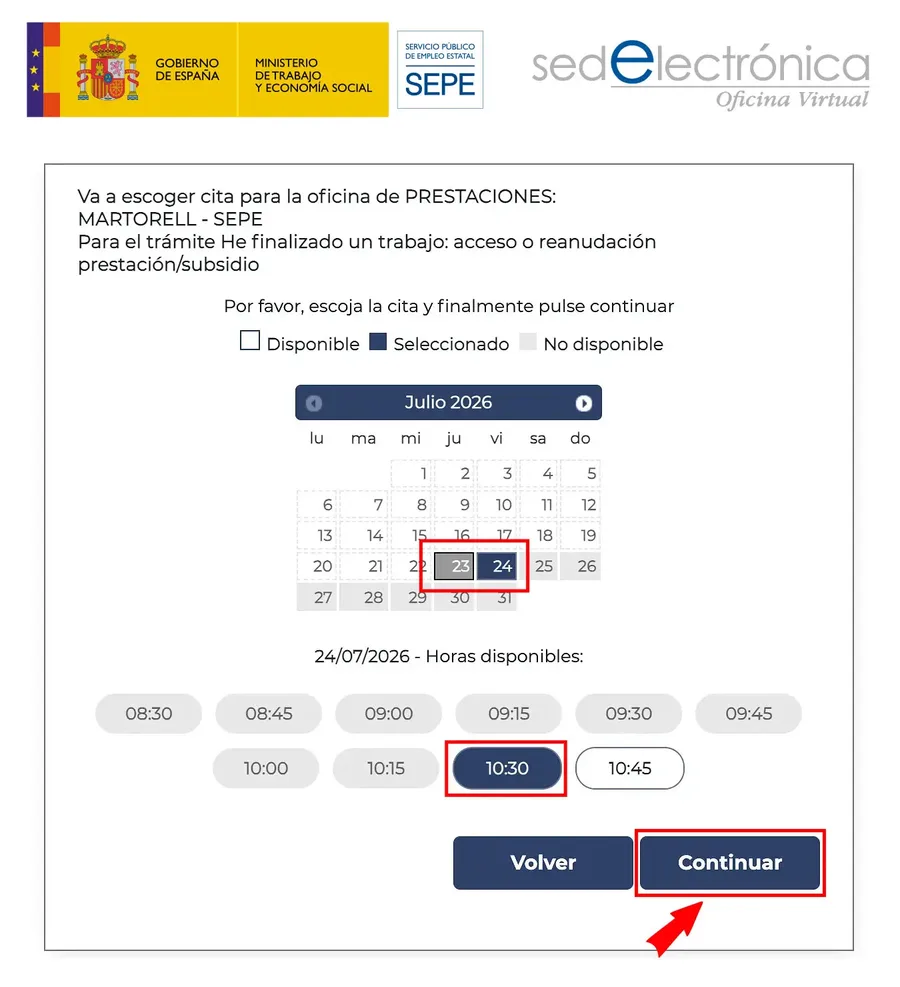
"Otras Citas": choose another day and time slot from the calendar. - Enter your personal details.
Complete the fields shown by the form. These include:
- Name
- First surname
- Mobile number
- Members of the family unit, depending on the procedure
- Privacy acceptance
- CAPTCHA
Select Finalizar.
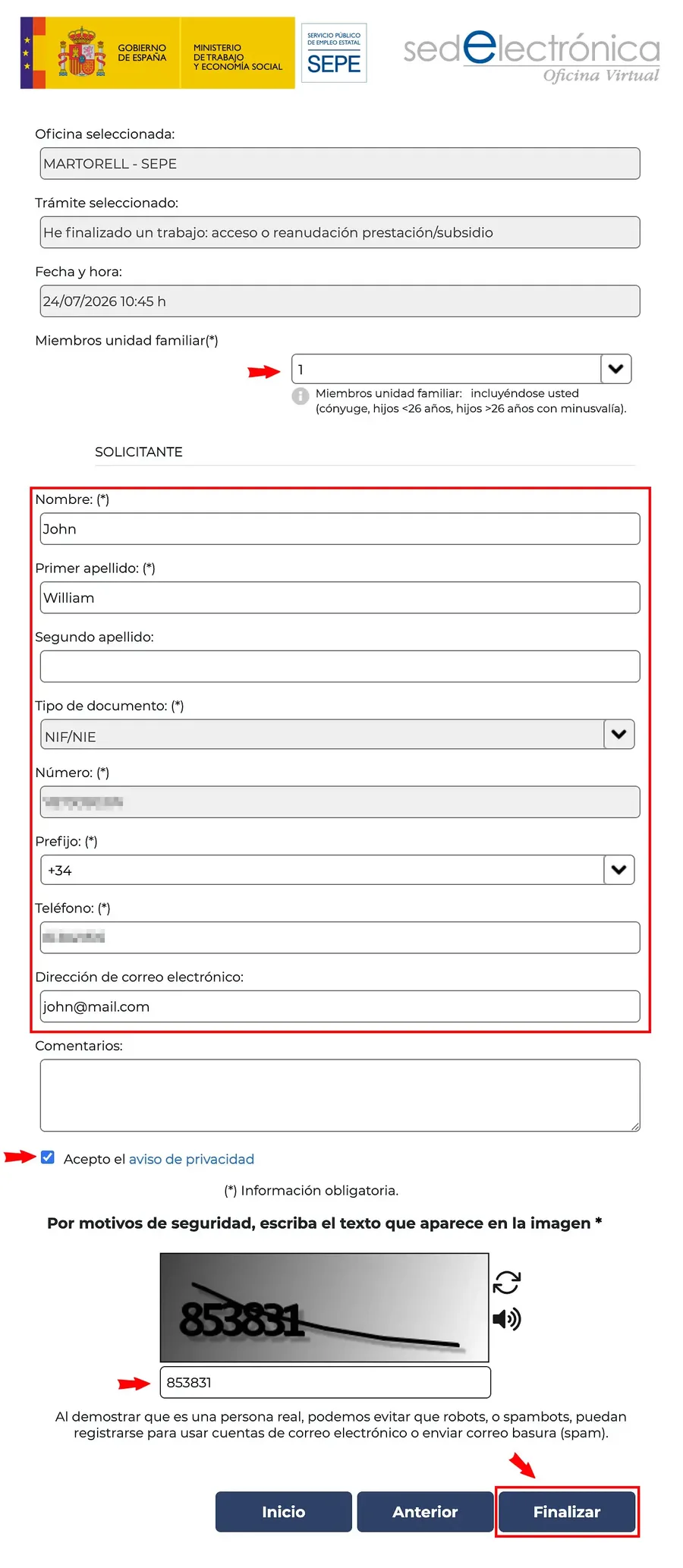
Complete your personal details and select "Finalizar". - Verify the appointment by SMS.
Enter the verification code sent to your mobile phone and continue.
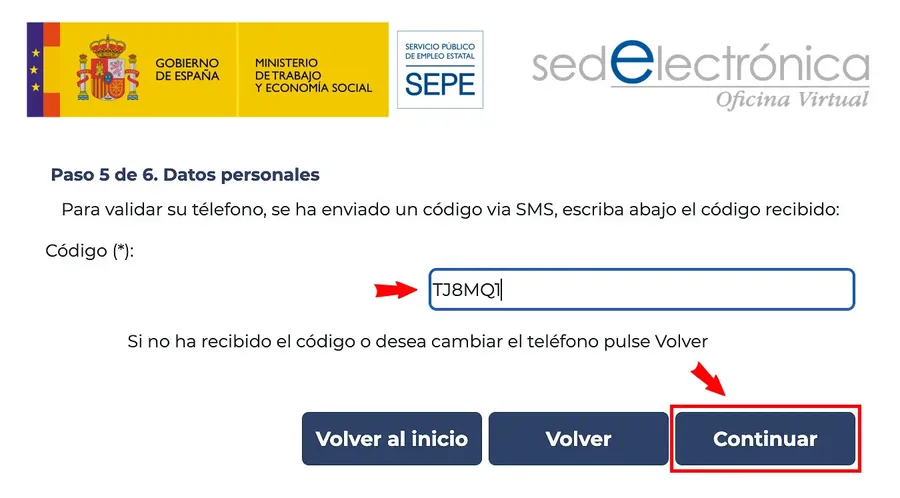
Enter the verification code you received by SMS. - Save the confirmation.
Check the appointment date, time, office and procedure. Save the locator code and confirmation details. You may need them later to change or cancel the appointment.
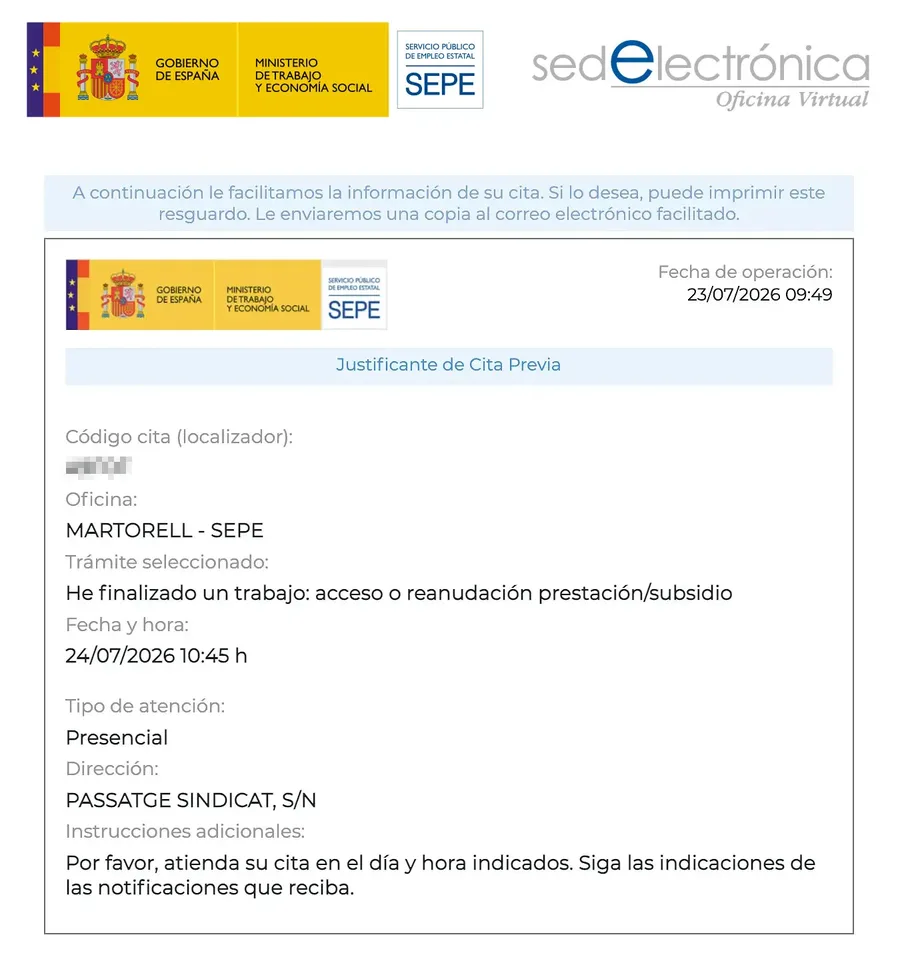
Your appointment confirmation: save the locator code and details.
How to Book a SEPE Appointment by Phone
Call SEPE’s automated appointment line on 91 926 79 70 (+34 from abroad). It is available 24 hours a day, every day.
For information about benefits, call 060. It does not book appointments and may cost money.
Numbers starting with 800, 807 or 900 that offer appointments are not SEPE numbers. Calls to 807 numbers cost extra.
When you need a SEPE appointment
You only need an appointment if you want to speak to someone at a SEPE benefits office in person. You do not need an appointment just to apply for a benefit. Find your office in the SEPE office directory, or see the local guides for Madrid and Barcelona.
You can apply online if you have a digital certificate, DNIe or Cl@ve. You can also apply through the Área Personal using PIN SEPE. If you prefer, you can submit your application at a public registry office or by administrative post.
In the Área Personal, you can also cancel an application or change your bank details. You do not need an appointment for this either.
What to bring to your SEPE appointment
Staff will only see you if your name and DNI or NIE match the booking. See our guide to SEPE documents needed for more details.
- Identification: Bring the DNI or NIE used for the booking. If you are not an EU citizen, bring your TIE.
- Appointment proof: Bring your confirmation and locator code.
- Bring documents for your procedure, including a completed form if needed. Employers usually send the certificado de empresa (employment certificate) to SEPE. Bring it only if you have it.
- Bring the IBAN for an account in your name.
- Bring family documents or SEPE letters if they relate to your case.
Common Problems
No appointments available
Check early in the morning and at different times of day: slots appear and disappear. Try the other offices the system offers, or call 91 926 79 70. If you need to claim benefit, do not wait for the appointment: use the pre-application or the sede electrónica. See our guide on what to do when no SEPE appointments are available.
Existing or lost booking
Use Comprobar, modificar o cancelar la reserva to check your booking. You can change it or cancel it.
Lost confirmation code
Check your confirmation email or SMS: the locator code is there. If an active appointment is linked to your DNI or NIE, the system may block a new booking until you cancel it or the date passes.
SMS code does not arrive
Check that your mobile number is correct and wait a few minutes. If it does not arrive, start the booking again.
Language help
Choose ENG on the booking form if you prefer English. Some screens stay in Spanish, so ask someone for help if needed.
Ayuda Trámites guides
Need something else with your appointment?
Frequently asked questions
Do I need a digital certificate or Cl@ve to book?
No. You can book an appointment without a digital certificate or Cl@ve. To claim online through the sede electrónica, you need a digital certificate, DNIe or Cl@ve.
Is booking a SEPE appointment free?
Yes. SEPE does not charge for an appointment.
Can I book a SEPE appointment by phone?
Yes. Call 91 926 79 70, SEPE's automated appointment line, available 24 hours a day. The appointment is free; you only pay for the call at your operator's rate.
What should I do if no appointments are available?
Check again early in the morning and at different times of day, or try the other offices the system offers. You do not need an appointment to claim benefit: use the pre-application or the sede electrónica.
Can I visit a SEPE benefits office without an appointment?
No. You need an appointment for in-person help at a SEPE benefits office. You can file a benefit claim without one through other channels.
How soon after losing your job must you file a benefit claim?
File your claim within 15 working days from the day after your last day of work. If you were paid for untaken holiday, the deadline starts after that holiday ends. The deadline is for filing, not booking. If you claim late, you lose the days of delay, not your right.
Can you get help in English at a SEPE office?
The booking form has an ENG option, but some screens stay in Spanish. English help at the office is not guaranteed. You can bring someone to help you communicate.
Official procedure
Official sources
These are the official sources for this guide:
- Cita previa del SEPE (sede electrónica) sede.sepe.gob.es
- Atención telefónica del SEPE www.sepe.es
These links go to official websites. The procedure is free of charge.
Spotted something incorrect? Email us at info@ayudatramites.es.