 Ayuda Trámites
You can check, change or cancel a SEPE appointment online using your DNI/NIE, appointment locator, postcode and office details. Open the official appointment portal and choose Comprobar, modificar o cancelar la reserva. If you have lost the locator or cannot use the website, call 91 926 79 70 or contact 060 for assistance.
You can manage your appointment online through the SEPE appointment portal, where you can check, change or cancel it. If the online service does not work, call the SEPE appointment line on 91 926 79 70 for assistance. Managing your appointment is free.
Online Cancellation
Cancelling online is the standard way. You need the locator code you received when you first booked your appointment, plus a few details about the booking.
- Go to the SEPE Electronic Headquarters. Open your web browser and go to the official SEPE website for appointments: Official SEPE Portal.
- Choose the Manage Option.
On the appointment page, look for Comprobar, modificar o cancelar la reserva (check, change or cancel the booking). This single option covers checking, changing and cancelling an existing appointment.
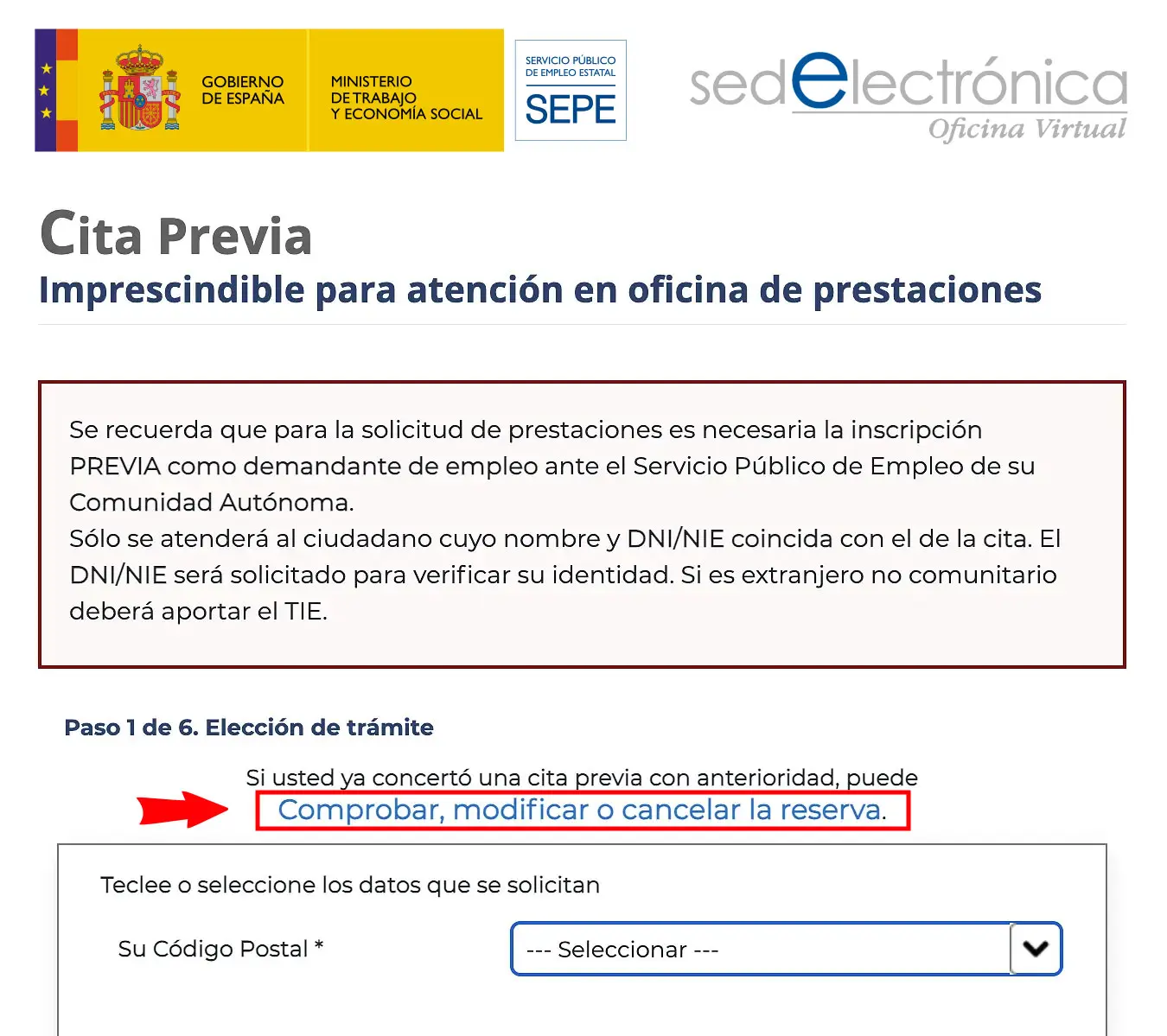
The SEPE appointment page: the link "Comprobar, modificar o cancelar la reserva" opens the form to check, change or cancel an existing appointment. - Enter Your Details.
The form asks for your ID number (`DNI` or `NIE`), your localizador de cita (appointment locator, for example TJ8MQ1, from your confirmation email or SMS), your postcode and the SEPE office of the appointment, and you must complete a CAPTCHA.
- Open and Cancel the Appointment.
The system will show your active appointment. Open it with Ver/Modificar and review the details. To cancel, click Anular and confirm. If you only need a different date or time, you may be able to choose Modificar fecha y hora de cita instead and pick a new slot, depending on the appointment and availability.
- Check the Confirmation. After confirming, the system should show an on-screen message confirming the change or cancellation. Keep a copy, for example a screenshot, for your records.
What You Need to Cancel
You do not need many documents to cancel a SEPE appointment, but you do need specific pieces of information to identify yourself or the appointment.
- Your `DNI` or `NIE` number: This is your primary identification number in Spain.
- Appointment locator code: A unique code provided when you booked your `cita previa`, usually found in the confirmation email or SMS.
- Postcode: The postcode you used when booking the appointment.
- SEPE office: The office where the appointment is booked.
- CAPTCHA: The form includes a CAPTCHA you must complete before submitting.
Common Problems
Lost your appointment locator?
The SEPE online form requires the locator code from your booking confirmation. Check your email, SMS or appointment receipt. If you cannot find it, call 91 926 79 70 or contact 060 for assistance.
The SEPE website is not working
Try again later or use another browser or device. If the problem continues, call 91 926 79 70 for help.
Cancel or change the appointment as soon as possible so the slot can be used by someone else.
Ayuda Trámites guides
Need something else with your appointment?
Frequently asked questions
Can I change my SEPE appointment directly?
Yes. Open Comprobar, modificar o cancelar la reserva, enter your appointment details and select Ver/Modificar. If modification is available for your appointment, choose Modificar fecha y hora de cita, pick a new date and time and confirm the change. The exact options can depend on the appointment and on available slots.
What happens if I miss my SEPE appointment without cancelling?
If you cannot attend, cancel or modify the appointment so the slot can become available to someone else.
Is there a deadline to cancel a SEPE appointment?
SEPE does not specify a strict deadline for cancellation. However, it is highly recommended to cancel your appointment as soon as you know you cannot attend. This allows the slot to become available for another person who might urgently need it. The sooner you cancel, the better it is for everyone.
Can someone else cancel my SEPE appointment for me?
Anyone managing the appointment will need the required identification and booking details, such as the `DNI` or `NIE` number, the appointment locator, the postcode and the office. Do not share these details unnecessarily.
How do I know if my SEPE appointment cancellation was successful?
After you confirm the cancellation online, the system should show an on-screen confirmation message. Keep a copy of it, for example a screenshot, in case you need proof later.
Official procedure
Official sources
These are the official sources for this guide:
- Cita previa del SEPE (sede electrónica) sede.sepe.gob.es
These links go to official websites. The procedure is free of charge.
Spotted something incorrect? Email us at info@ayudatramites.es.