 Ayuda Trámites


SEPE offices in Pontevedra
The province of Pontevedra has 17 SEPE benefit offices across 14 municipalities. The largest concentration is in Vigo, with 4 offices. All of them see people by free appointment (cita previa), Monday to Friday mornings only.
Map of the SEPE offices in Pontevedra (needs JavaScript). All offices are listed below.
Most searched SEPE offices in Pontevedra
All SEPE offices in Pontevedra
-
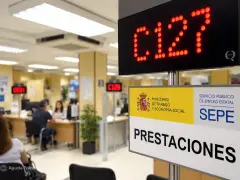 Oficina del SEPE de A CañizaC/ Otero Pedrayo, 10, 36880 A CañizaOpen Monday to Friday, 9:00 to 14:00
-
 Oficina del SEPE de A EstradaC/ Justo Martínez, 7, 36680 A EstradaOpen Monday to Friday, 9:00 to 14:00
-
 Oficina del SEPE de BaionaC/ Ecuador, 4, 36300 BaionaOpen Monday to Friday, 9:00 to 14:00
-
 Oficina del SEPE de Caldas de ReisC/ José Salgado, 41, 36650 Caldas de ReisOpen Monday to Friday, 9:00 to 14:00
-
 Oficina del SEPE de CambadosC/ Fonte de Fefiñans, 4, 36630 CambadosOpen Monday to Friday, 9:00 to 14:00
-
 Oficina del SEPE de Cangas de MorrazoAvenida de Lugo, 37, 36947 Cangas de MorrazoOpen Monday to Friday, 9:00 to 14:00
-
 Oficina del SEPE de LalínAvda. Buenos Aires, 45, 36500 LalínOpen Monday to Friday, 9:00 to 14:00
-
 Oficina del SEPE de O PorriñoC/ Torneiros-Ribeira, S/N, 36410 O PorriñoOpen Monday to Friday, 9:00 to 14:00
-
 Oficina del SEPE de PonteareasRúa Trovador Xoán Garcia de Guillade 8, Baixo, 36860 PonteareasOpen Monday to Friday, 9:00 to 14:00
-
 Oficina del SEPE de PontevedraC/ Benito Corbal, 47, 36001 PontevedraOpen Monday to Friday, 9:00 to 14:00
-
 Oficina del SEPE de RedondelaCarretera de Vigo, 10, 36800 RedondelaOpen Monday to Friday, 9:00 to 14:00
-
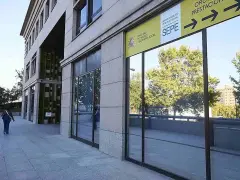 Oficina del SEPE de TuiC/ Alcalde Casal Aboy, 19, 36700 TuiOpen Monday to Friday, 9:00 to 14:00
-
 Dirección Provincial del SEPE de PontevedraC/ Cánovas del Castillo N.18 - Vigo, 36202 VigoOpen Monday to Friday, 9:00 to 14:00
-
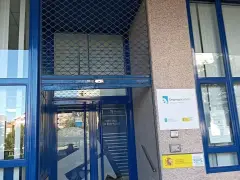 Oficina del SEPE de Vigo-El CalvarioC/ Gregorio Espino, 52, Portal 3, 36205 VigoOpen Monday to Friday, 9:00 to 14:00
-
 Oficina del SEPE de Vigo-López MoraC/ López Mora,50, 36211 VigoOpen Monday to Friday, 9:00 to 14:00
-
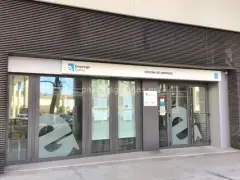 Oficina del SEPE de Vigo-NaviaC/ Teixugueiras, 17, 36212 VigoOpen Monday to Friday, 9:00 to 14:00
-
 Oficina del SEPE de Vigo-Sanjurjo BadiaC/ Sanjurjo Badia,35, 36207 VigoOpen Monday to Friday, 9:00 to 14:00
-
 Oficina del SEPE de Vilagarcía de ArousaC/ Castelao, 25, 36600 Vilagarcía de ArousaOpen Monday to Friday, 9:00 to 14:00
SEPE in the province of Pontevedra
To visit any of these offices you need a SEPE appointment (cita previa), free of charge and booked online or by phone.
Pontevedra city has one SEPE office and Vigo has four: El Calvario, López Mora, Navia and Sanjurjo Badía. The other 12 are in 12 different towns, one each: Vilagarcía de Arousa, Redondela, Cangas de Morrazo, Lalín, A Estrada, Ponteareas, O Porriño and Tui, among others.
With an appointment, any SEPE office in the province can deal with your claim; your postcode only sets the order of the list on the SEPE e-office (sede electrónica). If the nearest office has no free slots, pick another one in the province.
According to Google Maps, all 17 offices open Monday to Friday from 9:00 to 14:00. Looking for a SEPE office near you? Use the location button next to the search bar above.
SEPE phone number in Pontevedra: there is no direct number per office. You book on 91 926 79 70, an automated line that works 24 hours a day and costs the same as a call to a Spanish landline; questions about your benefit go to 060. All numbers are in SEPE phone numbers.
The SEPE Provincial Directorate in Pontevedra is at Calle Cánovas del Castillo, 18, in Vigo.
In Galicia, registering as a jobseeker (demanda de empleo) and renewing that registration (known as sellar el paro) happen at Servizo Público de Emprego de Galicia. The SEPE offices on this page handle unemployment benefits and subsidies.
Your SEPE appointment
Book an appointment at an office in Pontevedra
Pick your office and book the appointment on the official SEPE e-office.
Already have an appointment? Manage it here:
Change the date at SEPE Pontevedra? Change the date How to cancel an appointment at SEPE Pontevedra? Cancel appointmentThe appointment is free: you book it on the official SEPE website, and these guides walk you through each step.
Frequently asked questions
Do I need an appointment to go to the SEPE in Pontevedra?
Yes. To be seen at a SEPE benefits office in Pontevedra you need a cita previa (appointment); the SEPE e-office (sede electrónica) calls it essential for in-person help. It costs nothing and you book it on the SEPE appointment page or by calling 91 926 79 70. Step by step: how to book a SEPE appointment.
What can I do if there are no SEPE appointments in Pontevedra?
Try another office: with an appointment, any SEPE benefits office in Pontevedra can help you, for example the four in Vigo, the one in Pontevedra city or the one in Vilagarcía de Arousa. And you can claim paro or the subsidio without an appointment, online or with the pre-application form and a PIN SEPE. More options: no SEPE appointments available.
What are the opening hours of the SEPE offices in Pontevedra?
All 17 SEPE offices in Pontevedra open Monday to Friday from 9:00 to 14:00, according to their Google listing, including the four in Vigo. They are closed in the afternoon and at weekends. Each office page shows its own hours.
What is the SEPE phone number in Pontevedra?
The SEPE offices in Pontevedra have no phone line of their own. To book an appointment, call 91 926 79 70, an automated 24-hour service charged like a call to a landline. For questions about your benefit there is 060, the SEPE line for the public, which costs a flat one minute of call time; it does not book appointments. All numbers: SEPE phone numbers.
Is the employment office (oficina de empleo) in Pontevedra the SEPE?
No. Your demanda de empleo (jobseeker registration) and its renewal, known as sellar el paro, are handled by the Servizo Público de Emprego de Galicia, not the SEPE, which only deals with benefits. You can renew it on the Emprego Xunta website logging in with your DNI or NIE and a PIN sent by email or text, or in the MOBEM app. More: renewing your jobseeker registration.
Do I have to go to a SEPE office in Pontevedra to hand in documents?
No. You do not need to visit a SEPE office in Pontevedra or book an appointment to submit documents: you can file them online through the electronic registry with Cl@ve, a digital certificate or DNIe, send them by post through Correos, or take them to any public registry office. Each option explained: how to submit documents to the SEPE.
Spotted something incorrect? Email us at info@ayudatramites.es.