Ayuda Trámites


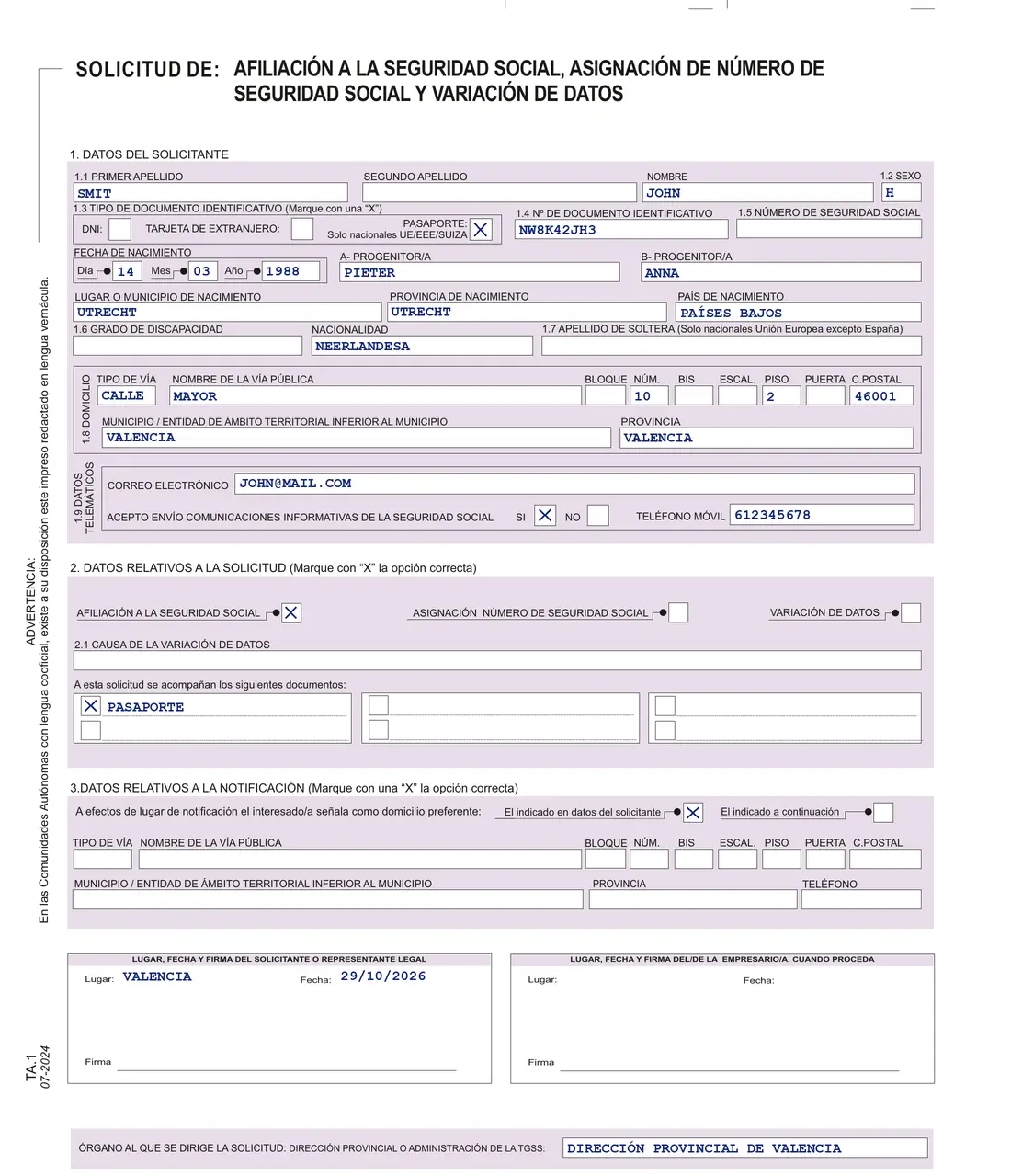
The TA.1 is the form to apply for a Spanish social security number or affiliation. Fill it in using capitals, with no crossings-out, and submit it to the Social Security treasury (TGSS) or on its e-office.
TA.1 form: interactive example
Move your mouse over a box to see what to fill in there and when. On a phone, tap the box.
What is the TA.1 form
The TA.1 form (TA1 form in Spain, also written TA1) is the Spanish social security number application form, sometimes called the NUSS form (número de la Seguridad Social). It covers Social Security affiliation, the assignment of a number and changes to your details. Your employer usually submits it before you start work. You apply yourself if the employer doesn't, if you want the number earlier or if you are self-employed (autónomo).
Moving for good? Start with the moving to Spain checklist.

Download the TA.1 form
The Tesorería General de la Seguridad Social (TGSS, the Social Security treasury) publishes the TA.1 as a fillable PDF, version 07-2024: you can fill it in on a computer, print it and sign it. Type it or write in CAPITALS, with no corrections or crossings-out. In regions with a co-official language, it is also available in that language.
Download the TA.1 (official PDF)
How to fill in the TA.1, box by box
The form is in Spanish, so write your answers in Spanish too.
- 1.1 Surnames and name
- PRIMER APELLIDO (first surname), SEGUNDO APELLIDO (second surname) and NOMBRE (first name) in full, as on your document.
- 1.2 SEXO (sex)
- H (hombre, man) or M (mujer, woman).
- 1.3 TIPO DE DOCUMENTO IDENTIFICATIVO (type of ID document)
- DNI (Spanish ID card), TARJETA DE EXTRANJERO (foreigner's card) or PASAPORTE (passport); the passport only when registering EU, EEA or Swiss citizens.
- 1.4 Document number
- The number of that document; with a foreigner's card, your NIE.
- 1.5 Social Security number and birth
- Only for a change of details. Below it: date, place and country of birth, parents A and B (PROGENITOR/A) and nationality.
- 1.6 Degree of disability
- Only if officially recognised, as shown on the certificate from IMSERSO or your regional government.
- 1.7 Maiden name
- Only EU nationals, except Spanish women.
- 1.8 Address
- Type of street (calle, plaza) and full name with no abbreviations, number, floor, postcode, municipality and province.
- 1.9 Contact details
- Email and mobile. Entering them means you accept informative messages from Social Security; also tick SI or NO at ACEPTO ENVÍO COMUNICACIONES INFORMATIVAS.
- 2 Type of application
- Tick AFILIACIÓN A LA SEGURIDAD SOCIAL (affiliation), ASIGNACIÓN NÚMERO DE SEGURIDAD SOCIAL (number assignment) or VARIACIÓN DE DATOS (change of details). For a change, the reason goes in 2.1 and you only fill in 1.1, 1.3, 1.4, 1.5 and the new detail.
- 3 Notification, place, date and signature
- Address for notifications: the one in 1.8 or another. You or your legal representative sign, and the employer when applicable. Addressed to: the Dirección Provincial or Administración of the TGSS (provincial office).
Where to submit your social security number application
- Online, with a digital certificate. Use the Asignación de número de Seguridad Social service on the e-office (sede electrónica), mentioned on the Social Security affiliation page. If the certificate fails, see digital certificate and Cl@ve errors.
- Online, without a certificate. Through Import@ss, the treasury's online portal: the Spanish social security number guide explains that route.
- In person. Hand in the signed TA.1 at the Dirección Provincial or Administración of the TGSS in the province where the employer is based, or where your business is if you are self-employed. Bring your ID document (DNI, foreigner's card or passport) and, if applicable, the disability certificate.
- Keep the receipt. The resguardo (receipt) shows the date your application was registered, which starts the deadline for an answer.

Common problems
I don't know which option to tick in section 2
AFILIACIÓN if you are about to start work and have never been affiliated; ASIGNACIÓN NÚMERO if for now you only need the number; VARIACIÓN DE DATOS if you already have a number and a detail has changed or needs correcting.
I only have a passport
If you are from the EU, the EEA or Switzerland, tick PASAPORTE; according to the TA.1 instructions you must provide your NIE within three months of entering Spain (article 7 of Royal Decree 240/2007), with the EX-18 form. Otherwise you need a foreigner's card (TIE): see how to get your NIE.
My employer says they can't register me without a number
The employer must request affiliation for anyone who starts work without being affiliated, before the first day, and can do so with this TA.1 and their signature. If they don't, you can request it yourself. Then check that your employment contract includes the number.
I haven't had an answer
The TGSS has 45 days from registration; the clock stops if they ask you to fix something, and you then have 10 days to do so or the application is closed. Without an answer in time, the application can be considered approved, according to the receipt itself.
Frequently asked questions
Is the TA.1 form free?
The PDF is a free download from the Social Security website, and the form includes no fee or payment box.
Does the social security number expire or change?
No. Affiliation is single for all schemes and lasts for life, so you keep the same number even if you change employer.
Is it the same as the affiliation number?
Yes. For anyone who is affiliated, the social security number is the same as their affiliation number (número de afiliación).
Can I apply before I have a job contract?
The TA.1 has an option just for the number, ASIGNACIÓN NÚMERO DE SEGURIDAD SOCIAL. Affiliation is requested before you start work.
Official procedure
Official sources
These are the official sources for this guide:
- Modelo TA.1 editable (Tesorería General de la Seguridad Social, PDF) www.seg-social.es
- Modelo TA.1 www.seg-social.es
- Afiliación y número de la Seguridad Social www.seg-social.es
- Real Decreto 240/2007, entrada y residencia de ciudadanos de la UE (BOE) www.boe.es
These links go to official websites. Booking an appointment and downloading official forms is free; if the procedure has an official fee, it is paid only to the authorities.
Spotted something incorrect? Email us at info@ayudatramites.es.